

U9play Withdrawal Guide Malaysia 2026
Withdrawing your balance from U9play is quick and straightforward. Before you request a withdrawal, just make sure your account and payment details are correct – this helps your money reach you without delays.
This guide walks you through the entire withdrawal process: submitting a request, verifying your payment, meeting the requirements, and fixing common issues if something goes wrong. Looking to add funds instead? Check our Deposit Guide.
How to Withdraw Money from U9play
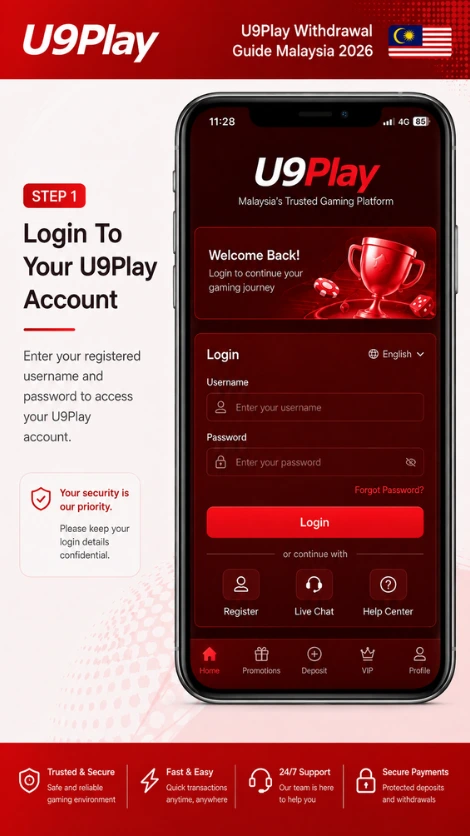
Step 1: Log In to Your Account
Go to the U9play Login page and sign in with your registered username and password. Once you’re in, head to your member dashboard – that’s where the withdrawal process starts.
New to U9play? Register for an account first.
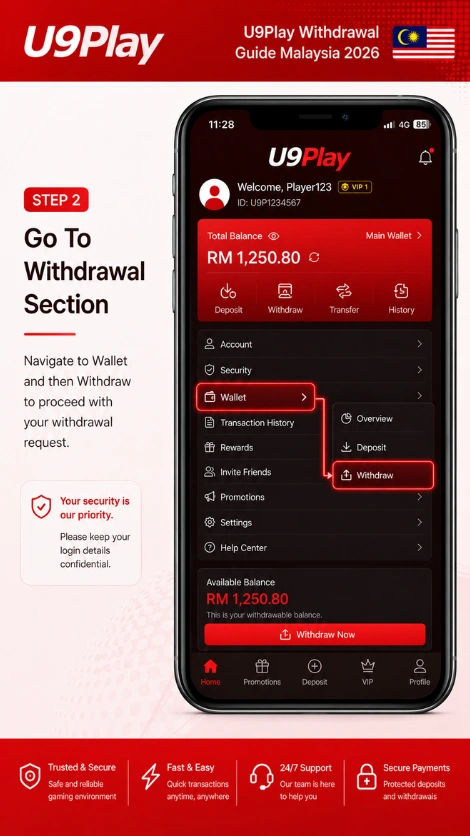
Step 2: Go to the Withdrawal Section
From your dashboard, go to Wallet, then select Withdraw. You’ll see your available balance here, and you’re ready to start your withdrawal request.
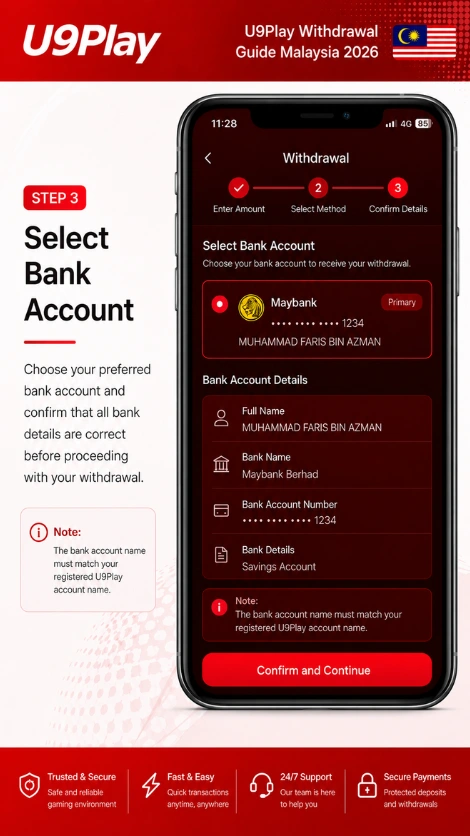
Step 3: Select Your Bank Account
Before you request a withdrawal, double-check that your bank account details are added correctly. You’ll need:
- Full name
- Bank name
- Bank account number
- Other bank details
Important: the name on your bank account must match your registered U9play account name – a mismatch is one of the most common reasons withdrawals get delayed or rejected. See our Payment Methods page for the full list of supported banks.
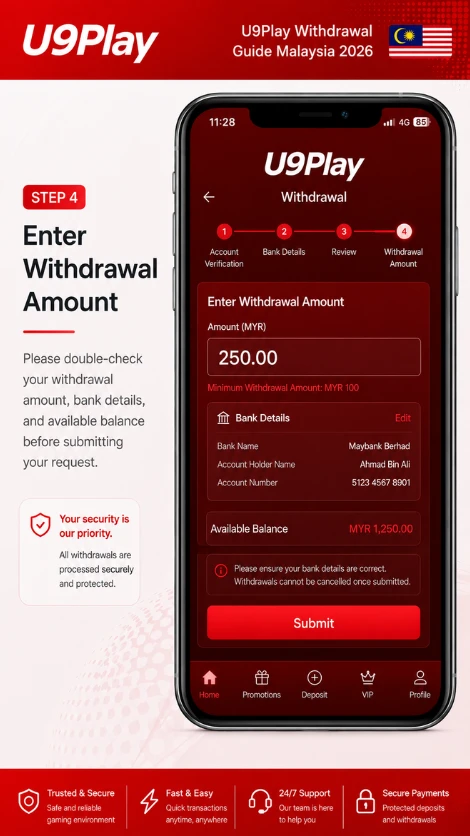
Step 4: Enter the Withdrawal Amount
Enter the amount you’d like to withdraw. The minimum withdrawal amount is $ 50.
Before you submit, double-check your withdrawal amount, bank details, and available balance – then tap Submit.
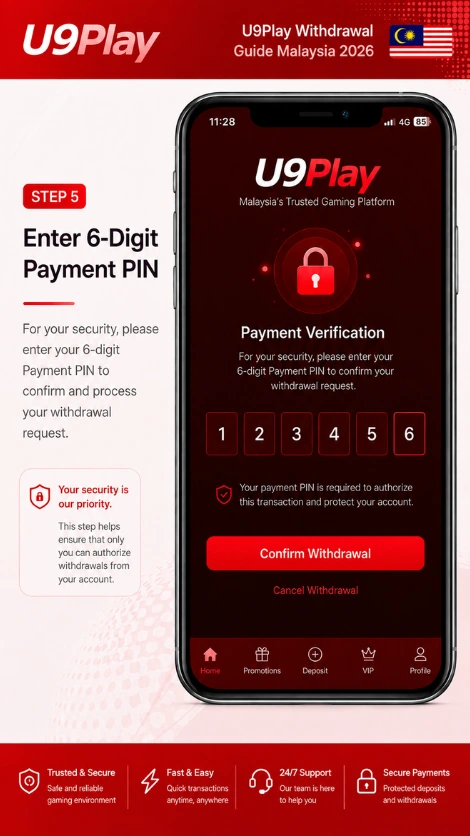
Step 5: Enter Your 6-Digit Payment PIN
For security, you’ll need to enter your 6-digit Payment PIN. This confirms it’s really you requesting the withdrawal before it goes to processing.
Step 6: Confirmation and Approval
Once you submit, your withdrawal request goes to review. You’ll see a confirmation page showing your withdrawal amount, order details, and request status. From here, just wait for approval from our system or customer service team.
Withdrawal Requirements
Before you request a withdrawal, make sure you have:
| Requirement | Details |
|---|---|
| Active Account | A registered U9play account |
| Bank Account | Valid bank account information |
| Account Name | Must match your registered details |
| Payment PIN | A 6-digit PIN |
| Balance | Enough available balance to withdraw |
Minimum Withdrawal Amount
| Currency | Minimum Amount |
|---|---|
| MYR | 100 |
Withdrawal Processing Time
How long your withdrawal takes depends on a few things – your payment method, whether your account needs verification, and how busy our review system is. Once you’ve submitted your request, just sit tight while it’s reviewed and approved.
Why Is My Withdrawal Pending?
If your withdrawal is still pending, it’s usually one of these:
Account Verification
We may need to verify your account details before approving the request.
Incorrect Information
Wrong or mismatched bank details are one of the most common causes of delay.
High Transaction Volume
During busy periods, reviews can simply take a little longer than usual.
Common Withdrawal Problems
Withdrawal Rejected
This usually happens because of wrong bank account details, an account name that doesn’t match, or an unresolved verification issue.
Solution: double-check your payment information and submit your request again with the correct details.
Withdrawal Not Received
If your withdrawal was approved but hasn’t arrived yet, check your bank account details, the transaction status, and typical processing times for your payment method. Still nothing? Contact our support team and we’ll look into it.
Tips for a Faster Withdrawal
- ✅ Withdraw to a bank account in your own name
- ✅ Double-check your account details before submitting
- ✅ Keep your Payment PIN private and secure
- ✅ Confirm your withdrawal amount before you submit
- ✅ Avoid submitting the same request twice
Frequently Asked Questions
Here are quick answers to a few common questions. For more, visit our full FAQ page.
What is the minimum withdrawal amount on U9play?
The minimum withdrawal amount on U9play is MYR 100.
How do I withdraw money from U9play?
Log in to your account, go to the Withdrawal section, enter your withdrawal amount, confirm with your Payment PIN, and submit your request.
Why does U9play require a Payment PIN?
It’s a security step that confirms the withdrawal request is really coming from you before it’s processed.
Can I withdraw without adding a bank account?
No – you’ll need to add valid bank account details before you can submit a withdrawal request.